Straight answers about the hardware and formats you already own
Explanations of the standards behind home networking, TV and audio, and file formats. Written to be correct rather than long, with sources on every article.
Home network and Wi-Fi
Wi-Fi standards, bands, coverage and the diagnostics that actually narrow down a slow connection.
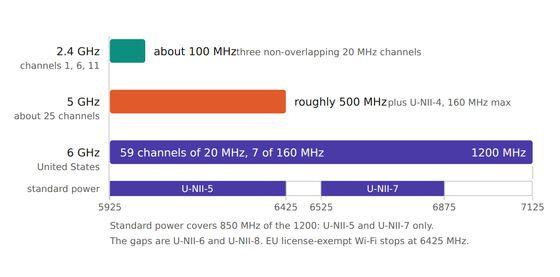
2.4 GHz vs 5 GHz vs 6 GHz: which band for which device
How to split devices across 2.4, 5 and 6 GHz: real path loss numbers, the DFS stability tax, 6 GHz power caps, and the band steering setting that breaks IoT.
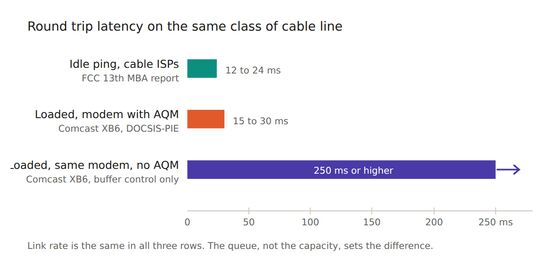
Bufferbloat, and why a fast line still stutters
A 900 Mbit/s speed test and a stuttering video call are both true. What bufferbloat is, how to measure loaded latency, and what fq_codel, CAKE and L4S each fix.
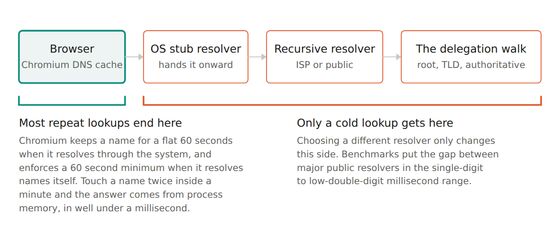
DNS explained, and whether changing your resolver helps
How DNS resolution, TTL and caching really work, why a faster resolver almost never speeds up browsing, and the three reasons that do justify switching.
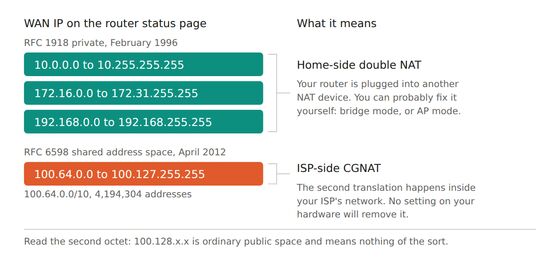
Double NAT and CGNAT: how to tell which you have, and what actually breaks
Your router's WAN IP settles it: an RFC 1918 address means home-side double NAT, 100.64.0.0/10 means ISP CGNAT. Here is what each breaks and what fixes it.
Ethernet cable categories: Cat5e through Cat8, and what you need
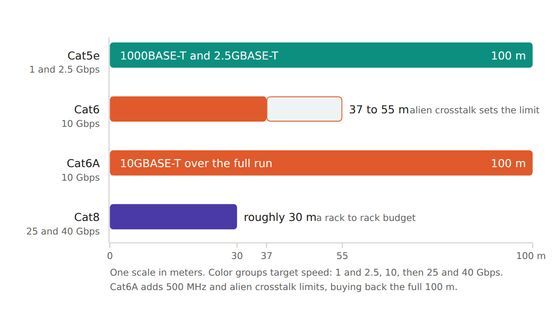
Cat5e carries Gigabit and 2.5 Gbps at 100 meters, Cat6A is the honest upgrade for a wall run, and Cat8 stops at 30 meters for speeds no home device reaches.
Guest networks and keeping smart home gear off your main LAN
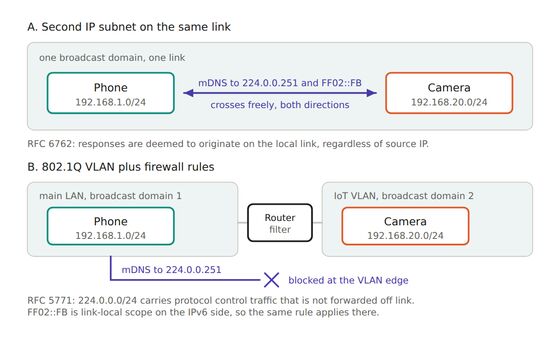
A guest SSID is a firmware convenience, not a security boundary. How client isolation, a second subnet and an 802.1Q VLAN differ, and what each one breaks.


TV, audio and streaming
HDMI, HDR, TV audio return channels and what streaming quality really depends on.
ARC vs eARC: getting sound out of your TV correctly
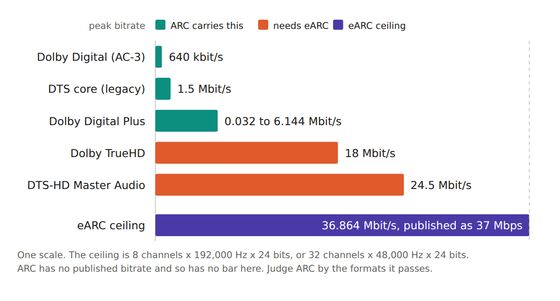
ARC tops out at compressed 5.1 while eARC carries 37 Mbps of uncompressed audio, so lossless Dolby Atmos needs eARC, the labeled port and the right cable.
Casting is two mechanisms, not one
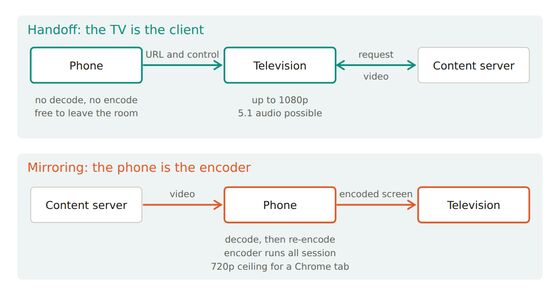
Casting either hands the TV a URL to fetch by itself or ships it an encoded copy of your screen. Which one a button triggers explains most failures.
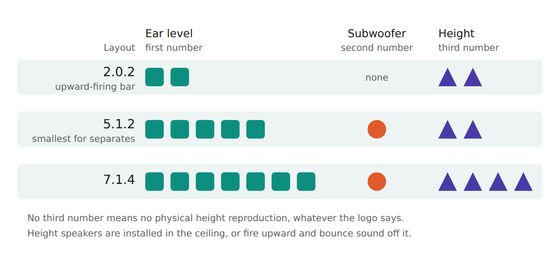
Dolby Atmos and surround sound formats, decoded
Why Dolby Atmos is metadata inside TrueHD or Dolby Digital Plus, what the third number in 5.1.2 tells you, how DTS:X compares, and what virtual height does.
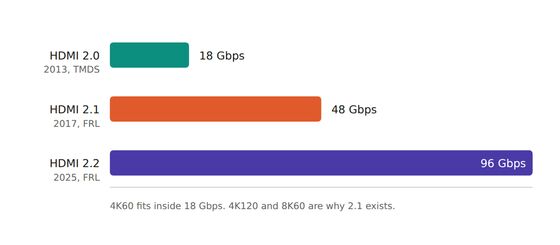
HDMI 2.0 vs 2.1: when the cable actually matters
HDMI 2.0 tops out at 18 Gbps and HDMI 2.1 at 48 Gbps, but every 2.1 feature is optional, so only Ultra High Speed cable certification guarantees anything.
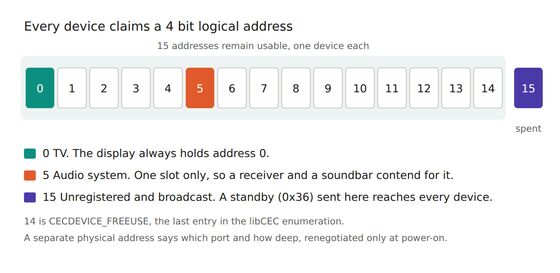
HDMI-CEC: one remote, many brand names, and why it half works
HDMI-CEC is a slow control bus on pin 13, sold under 22 trade names. What it does on the wire, how it fails, and which device to disable first.
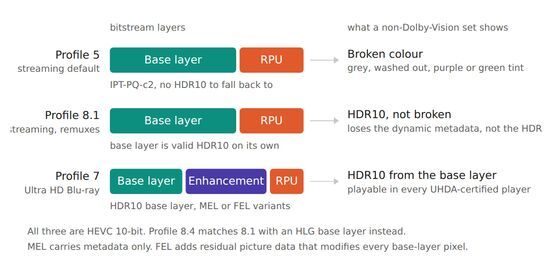
HDR formats explained: HDR10, HDR10+, Dolby Vision and HLG
HDR10 sends one tone-mapping curve per film, HDR10+ and Dolby Vision send one per scene, and HLG sends none, but your TV's brightness matters more.


Files, formats and backups
Codecs, image formats, backup strategy and moving large files around without losing them.
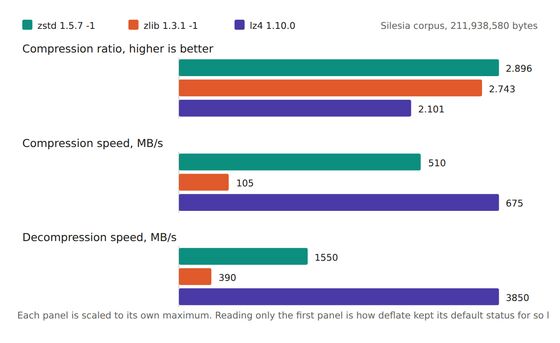
Archive formats and compression: what actually decides the choice
Ratio is the least useful number for picking an archive format. What tar, zip, zstd, xz, 7z and dedup backup really cost, with primary sources.
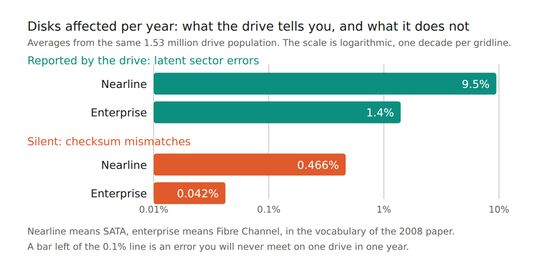
Bit rot, checksums, and the copy nobody checked
Silent disk corruption is measured, rare and widely misquoted. The commoner failure is an unverified copy. The studies, and the commands that catch both.
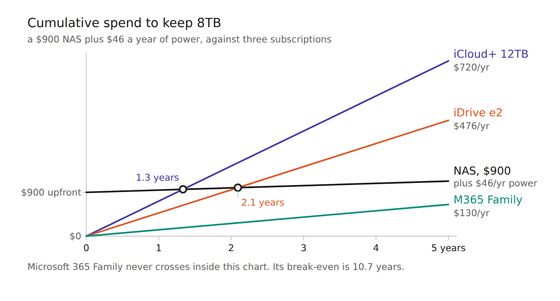
Cloud storage versus a NAS: the honest cost comparison
Verified July 2026 prices per TB per year for B2, Wasabi, iDrive e2, R2, iCloud and Microsoft 365, set against NAS power draw and real break-even in years.
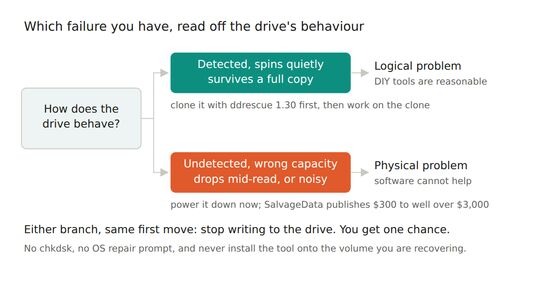
Data recovery: what works, what makes it worse
Why stopping every write matters most, how TRIM makes SSD deletion permanent, when DIY recovery software is safe to run, and what a clean-room lab costs.
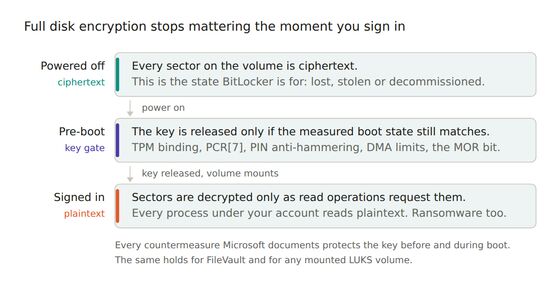
Encrypting drives and files: BitLocker, FileVault, LUKS and VeraCrypt
Disk encryption protects a laptop that is powered off, not one you are logged into. What BitLocker, FileVault, LUKS and VeraCrypt cost you in access risk.
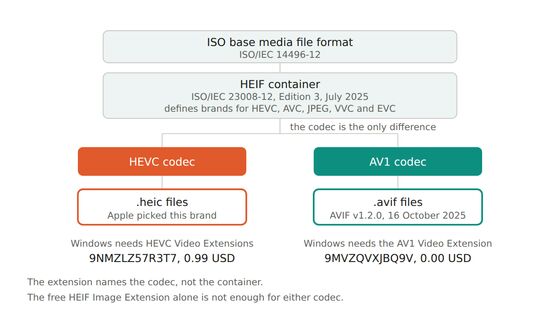
JPEG, PNG, WebP, AVIF and HEIC: which format when
AVIF for web photos with a JPEG fallback, PNG for screenshots, WebP if you want one format, and HEIC only inside Apple, because no other browser reads it.


